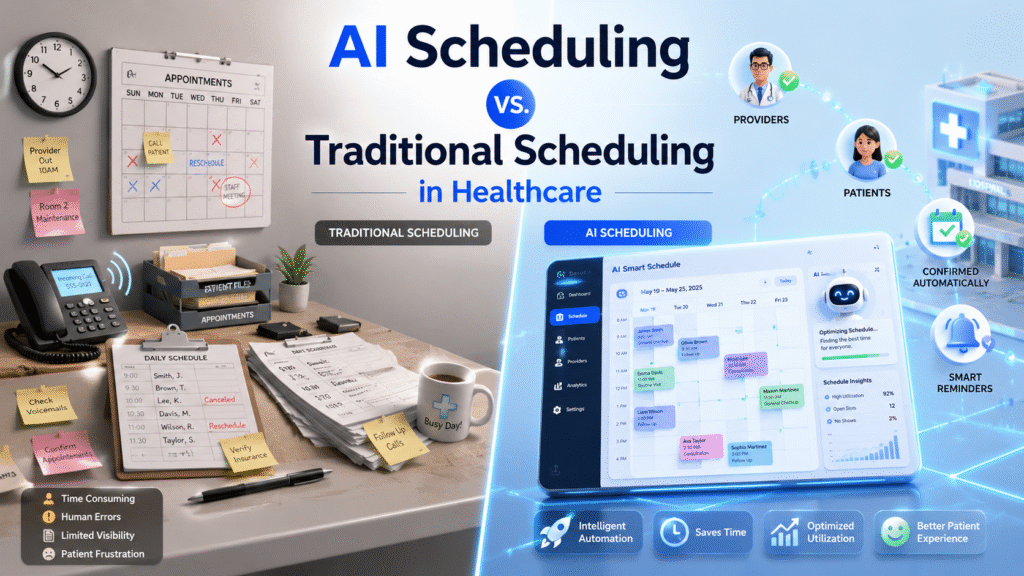
It’s 8:02 a.m. at a twelve-provider primary care practice, and the front desk phone has already rung four times. One caller wants to move a Thursday physical to next week. Another is a new patient trying to get in before her insurance deductible resets in January. A third gives up after two minutes on hold and calls a competing practice instead.
By 8:15, the scheduling coordinator has three sticky notes, two double-booked 2 p.m. slots, and a waitlist she hasn’t opened since Monday. None of that is because she’s bad at her job. She’s solving a real-time optimization problem with a phone and a shared calendar, and both tools were built for a slower version of healthcare than the one she’s working in.
That scene, or something close to it, repeats every morning in medical groups, ACOs, and health plan-affiliated clinics across the country. It’s also why “AI scheduling vs. traditional scheduling” has become one of the more common searches in healthcare operations. Leaders aren’t asking whether software can technically book an appointment. They’re asking whether predictive scheduling technology actually moves the numbers they’re held to: no-show rates, provider utilization, patient access, and revenue per available slot.
The short answer: AI-based scheduling outperforms manually managed scheduling on most of the metrics health systems track, from missed-appointment rates to time-to-next-available-appointment. It works best layered on top of good staff and clean processes, though, not as a wholesale replacement for either. The rest of this guide walks through why, with the mechanics behind it.
What Traditional Scheduling Actually Looks Like Today
“Traditional scheduling” covers a wider range of setups than the phrase suggests. At the low end, it’s a paper appointment book or a shared spreadsheet. More often in 2026, it’s a practice management system with a digital calendar grid that a staff member still fills in by hand, appointment by appointment, based on whatever the patient says on the phone and whatever the provider’s preset template allows.
Two things define traditional scheduling regardless of which tools sit underneath it: a human makes every placement decision, and each department usually can’t see what the others are doing.
The Phone Tag Problem
Rescheduling under a traditional model triggers a chain of phone calls. A patient cancels, staff calls the next person on a paper or informal waitlist, that person doesn’t pick up, staff moves to the next name, and the slot often stays empty long enough that it’s no longer worth filling before the appointment time passes. Every schedule change starts this chain over.
The Static Template Trap
Most practice management systems assign fixed appointment lengths by visit type: 15 minutes for a follow-up, 30 for a new patient, regardless of what that specific patient’s chart suggests about complexity. A diabetic patient with three comorbidities gets the same slot as a healthy 28-year-old there for a wellness check. Providers either run over and stack delays through the rest of the day, or a straightforward visit eats a slot that could have absorbed a same-day sick call.
What AI Scheduling Means in a Clinical Setting
AI scheduling replaces static rules with a model trained on the organization’s own historical appointment data: who showed up, who didn’t, how long visits actually ran versus how long they were booked for, and which combinations of factors predicted each outcome.
In practice, that means the system pulls signal from sources a human scheduler would never cross-reference in real time:
- Patient-level history — prior no-shows, cancellation patterns, time since last visit
- Visit-level factors — appointment type, day of week, time of day, weather forecast for the appointment date
- Provider-level patterns — which providers run long with certain visit types, typical turnover time between patients
- Resource constraints — room availability, equipment booking, staff coverage
The system uses that data to predict no-show risk per appointment, right-size appointment length instead of applying a flat template, and automatically reshuffle the calendar when something changes, without waiting for a human to notice a gap and start making calls.
AI Scheduling vs. Traditional Scheduling: Side-by-Side
| Factor | Traditional Scheduling | AI Scheduling |
|---|---|---|
| No-show prediction | None — same risk applied to every booking | Per-appointment risk score from historical data |
| Rebooking a cancellation | Manual calls down a waitlist | Automatic matching to waitlisted patients by urgency and fit |
| Appointment length | Fixed by visit type | Adjusted using patient and visit complexity |
| Multi-resource coordination | Handled separately by each department | Rooms, equipment, and staff booked as one system |
| Patient self-service | Phone only, during business hours | Online and mobile booking, 24/7 |
| Visibility across departments | Siloed calendars | Shared, real-time view |
| Staff time per schedule change | Several minutes of calls per change | Seconds, mostly automated |
| Scalability across locations | Each site manages independently | One model applied consistently across sites |
The table makes the comparison look tidier than it is in practice. AI scheduling still needs accurate data flowing in from the EHR and practice management system to make good predictions — a health system with messy, disconnected records won’t get the gains this table implies just by buying scheduling software.
The Real Cost of Sticking With Traditional Scheduling
Missed appointments are the most visible cost, but they’re not the only one.
Lost Revenue Per Empty Slot
Outpatient no-show rates commonly run somewhere between 15% and 30%, with wide variation by specialty, payer mix, and patient population — behavioral health and pediatrics tend to run higher than, say, ophthalmology. Missed visits are frequently estimated to cost the U.S. healthcare system well over $100 billion a year in lost provider time and idle capacity. Every empty slot that can’t be refilled in time is revenue a practice never recovers, since the provider’s overhead runs whether or not a patient is in the room.
The Staffing Toll
Front-desk and scheduling staff spend a meaningful share of a shift on the phone: confirming appointments, chasing cancellations, and calling down waitlists one name at a time. That’s staff time not spent on patient intake, prior authorization follow-up, or other work that actually requires a person’s judgment.
Where AI Scheduling Delivers Measurable Gains
Reduced No-Show Rates
Predictive models flag high-risk appointments before they happen, based on the same factors listed earlier — appointment type, patient history, day of week. Staff can then target those specific patients with an extra reminder call or a text confirmation, instead of sending the same generic reminder to every patient on the schedule regardless of risk.
Faster Rebooking and Waitlist Fill
When a cancellation comes in, the system checks the waitlist against urgency, provider preference, and appointment type, and offers the slot automatically — often through a text or app notification the patient can accept with one tap. That collapses what used to be a chain of phone calls into a near-instant match.
Higher Provider Utilization
Right-sized appointment lengths mean providers spend less of the day either idle or running behind. A schedule built from actual visit-duration data, rather than a flat 15/30/45-minute template, tends to hold together better across a full clinic day.
Multi-Resource and Equipment Coordination
For specialties that depend on shared equipment — imaging, infusion chairs, procedure rooms — AI scheduling books the room, the equipment, and the provider as one transaction instead of three separate ones handled by three different people who may not be looking at each other’s calendars.
The Effect on Providers and Staff
Traditional scheduling tends to push providers toward one of two extremes: back-to-back complex cases with no buffer, or stretches of underbooked time that don’t get filled until it’s too late to matter. Neither is sustainable across a full week, and the unpredictability itself contributes to burnout independent of total patient volume.
AI scheduling doesn’t eliminate hard days, but it does spread complexity more evenly and gives staff fewer manual reconciliation tasks — double-booked slots, missed confirmation calls, waitlists nobody had time to work. That shifts staff time toward tasks that need a person: complex insurance questions, patients who need extra explanation, situations requiring genuine empathy rather than logistics.
The Effect on Patients: Access, Equity, and Trust
Access and Equity
Phone-only scheduling during business hours is a real barrier for shift workers, single parents, and anyone without flexible time during a 9-to-5 window. Online and app-based self-scheduling removes that constraint. Well-built systems go further — offering multilingual interfaces, flagging appointment slots that align with public transit schedules in areas where patients rely on it, and surfacing telehealth options for patients facing transportation barriers.
Trust and Privacy
Patients are reasonably cautious about a system making decisions using their health data. Building trust means being specific about what data the system uses and why, keeping a human reachable for anything the algorithm gets wrong, and applying standard safeguards — encryption, access controls, audit logging — consistently. AI should handle the routine matching and rebooking; a person should still be the one a patient can escalate to.
Where AI Scheduling Still Falls Short
A fair comparison has to include the limits.
- Data quality dependency. A model trained on incomplete or inconsistent historical data will make weak predictions — this is true of any predictive system, and scheduling data quality varies widely between organizations.
- Judgment for edge cases. Complex triage decisions, VIP or provider-specific scheduling preferences, and unusual clinical circumstances still need a human in the loop. AI narrows the routine cases a scheduler has to handle manually; it doesn’t remove the need for scheduling staff.
- Implementation lift. Integrating a scheduling engine with an existing EHR and practice management system takes real setup work, and organizations running older or heavily customized systems should expect that timeline to stretch.
- Change management. Staff who’ve scheduled a certain way for years need training and a reason to trust the new system’s recommendations before they’ll rely on it during a busy day.
None of these are reasons to skip AI scheduling. They’re reasons to plan the rollout instead of assuming a new tool solves the problem on installation day.
Making the Shift: A Practical Implementation Path
- Audit current pain points first. Pull actual no-show rates, average time-to-next-appointment, and staff hours spent on scheduling calls before choosing a vendor or tool. This becomes the baseline for measuring whether the change actually worked.
- Start with the highest-friction specialty. Behavioral health, primary care, and any department with a high no-show rate typically shows the fastest, most visible improvement — a better place to pilot than a low-volume specialty clinic.
- Fix the data feed before the software. AI scheduling is only as good as what flows into it from the EHR and practice management system. Clean up duplicate patient records and inconsistent visit-type coding before go-live.
- Pilot with one team, not the whole organization. Run it in parallel with existing scheduling for a few weeks, compare outcomes, and let that team’s experience shape the rollout plan for everyone else.
- Train staff on what changed, not just how to click. Staff need to understand why the system is recommending a given slot or flagging a patient as high no-show risk, or they’ll quietly override it and the gains disappear.
- Review the metrics monthly, not annually. Scheduling patterns shift with seasons, provider changes, and payer mix. A system tuned once and left alone drifts out of accuracy.
Metrics That Prove Whether Scheduling Technology Is Working
Track these before and after any scheduling change to know whether it’s actually paying off:
- No-show rate, by specialty and by provider
- Time-to-third-next-available appointment — a standard access metric used across ambulatory care
- Slot fill rate within 24 hours of a cancellation
- Average hold time on scheduling calls
- Staff hours spent on manual scheduling tasks per week
- Patient-reported satisfaction with the booking experience specifically, not just the visit itself
FAQs
Does AI scheduling replace scheduling staff?
No. It automates the repetitive parts — rebooking cancellations, matching waitlists, sending targeted reminders — so staff spend more time on complex cases, insurance questions, and patients who need extra help, rather than fewer roles overall.
How much can AI scheduling reduce no-shows?
Results vary by organization, patient population, and how well the underlying data is integrated, but organizations that pair predictive no-show flagging with targeted reminders typically see a measurable drop from their baseline rate. The size of the improvement depends heavily on data quality going in.
Is AI scheduling secure and HIPAA-compliant?
It can be, provided the vendor applies standard safeguards: encryption in transit and at rest, role-based access controls, and audit logging. Any system touching patient scheduling data needs a signed business associate agreement, same as any other HIPAA-covered tool.
What data does an AI scheduling system need to work well?
At minimum, historical appointment records including outcomes (kept, canceled, no-showed), visit types, and provider assignments. Better predictions come from also integrating EHR data, patient communication history, and practice management system records.
Can small practices use AI scheduling, or is it only for large health systems?
Both. Smaller practices often see AI scheduling through their practice management system as a built-in feature rather than a separate purchase, while large health systems and ACOs typically need a platform that can unify data across many locations and departments.
How long does it take to implement AI scheduling?
Timeline depends on the current state of the organization’s data. A practice with a clean, single EHR can often pilot within a few weeks; a multi-site health system integrating several legacy systems should expect a longer rollout measured in months.
Does AI scheduling work across multiple locations or specialties?
Yes, and this is where it tends to outperform traditional scheduling most clearly — a shared model applied consistently across sites reduces the maze of location-specific rules and calendars that human schedulers otherwise have to learn one by one.